
Inside Sesimi - Latest News and Stories
Stay up to date with the latest news and insights from the Sesimi team.
QSR Marketing: Keep Every Location on Brand
Published on 13 Oct 2026 by Sesimi Editorial
A new menu, refreshed identity or growing restaurant network creates marketing work at every location. Quick-service restaurant (QSR) brands need to turn those changes into accurate, recognisable campaigns that local teams can deliver on time. Clear workflows connect national strategy with local execution.
This Article In short:
Give every location access to current assets, approved templates and clear campaign instructions. Let local teams adapt relevant details within defined brand rules so they can respond to change without sending every update through head office.
Turn brand strategy into consistent local execution
One national promotion can require dozens of variations across store signage, digital menus, social posts and customer communications.
Prices, opening hours and product availability may vary by location. Campaign materials need to reflect those differences while keeping the brand recognisable. During a rebrand, teams also need to know which materials to replace and when the new identity takes effect.
Define what each location needs to deliver. Give every campaign a named owner, launch date, approved assets and clear instructions on participation and permitted changes.
Plan the formats and local variations during creative development so stores have the materials they need for launch.
A store needs a weekend offer poster with its own price and opening hours. Instead of emailing head office for a new design, the manager updates those fields in an approved template. The logo, product image and offer terms stay protected, and the poster is ready for the required review.
Make approved assets easy to find and use
Local teams need to know which file is current, what it is for and whether they can use it. A folder full of similar filenames leaves store managers to work that out themselves.
A central digital asset management library gives teams one place to find approved logos, product photography and campaign materials. Organise assets by campaign, format, location and availability date so teams can find what they need.
During a rebrand, identify which materials need replacing, publish approved replacements and remove outdated files from everyday access. Assign responsibility for updating both physical materials and digital channels.
Make the right asset easy to find and use, including for staff who do not work in marketing.
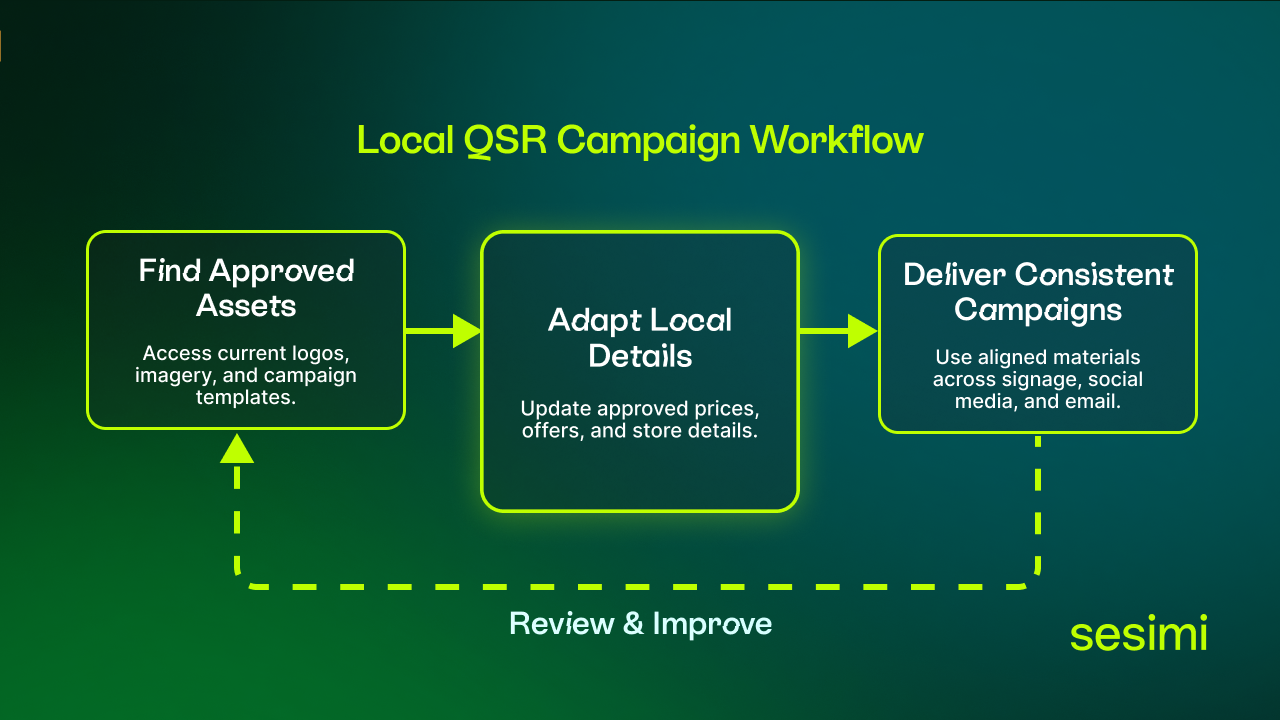
Approved assets and adaptable templates help local teams deliver consistent QSR campaigns across every location.
Make the right asset easy to find and use, including for staff who do not work in marketing.
Give local teams room to adapt
A store promoting a community event needs different content from one announcing extended opening hours. Both can reflect local needs while remaining recognisably part of the same brand.
Define which elements stay fixed and which can change. Protect logos, typography, product imagery and required messaging, while allowing teams to edit store details, approved offers and opening hours.
Creative automation embeds these rules in reusable templates so teams can create local variations without rebuilding each design. Check required fields and route exceptions to the appropriate reviewer.
Routine edits within approved rules can follow a simpler process. New claims, unapproved offers or substantial design changes need closer review, with clear responsibility for each decision.
Automating repeated production tasks gives creative teams more time to develop distinctive campaigns and reduces the need for stores to request basic adaptations.
Coordinate campaigns across customer touchpoints
Customers may discover an offer in an email, see it on social media and then visit a restaurant. For the same offer at the same location, prices, availability and terms need to agree across those touchpoints.
For example, a limited-time menu launch could follow this workflow:
- Prepare the campaign: Head office defines the offer, participating locations, dates and approved creative.
- Adapt local details: Store teams update permitted fields in approved templates.
- Check accuracy: Teams confirm pricing, availability and required approvals.
- Coordinate delivery: Signage and digital communications use the same offer details and launch schedule.
- Close the campaign: Teams remove expired materials and publish replacements.
For a local offer, use customer location or preferred-store data, where available, to reach customers near participating restaurants. Keep the message aligned with the store’s approved offer and campaign dates. Even a well-designed message can disappoint customers if it promotes a product their local store does not offer.
Creative and customer communication teams need to work from the same campaign information, with clear ownership of updates and shared instructions for delivery.
Build a process that improves as the network grows
As the network grows, more people need to find assets, adapt materials and follow campaign instructions. A repeatable workflow gives new stores a clear way to participate from the start.
The Bakers Delight case study shows how approved templates support local marketing across a franchise network:
- More than 520 bakeries supported across Australia.
- 902 downloads per month, on average.
- 38% more monthly downloads than the previous benchmark.
Franchisees can adapt common local materials while core brand elements remain protected. The download figures show increased use of approved marketing resources.
Measure campaign execution alongside customer response. Track time from brief to launch, revision volume, store participation and use of approved materials. Review engagement, offer redemption and attributable sales to understand campaign performance.
Use the findings to improve the next campaign. Repeated corrections may reveal unclear instructions. Low participation may indicate that templates do not meet local needs. Frequent requests for the same material can help prioritise new self-service templates.
Start with your next campaign
Map how one upcoming promotion moves from head office to each location. Identify where teams struggle to find files, repeat edits or wait for decisions. Use those findings to improve asset access, templates and ownership before launch.
Meet Sesimi and Taguchi in Sydney
Sesimi and Taguchi are sharing a stand at the QSR Media Conference & Awards 2026 on 12 October at Sheraton Grand Sydney Hyde Park. The conference will explore adaptation, rebranding, digital innovation, customer experience and growth.
Visit the joint stand to discuss how your network plans, creates and delivers local campaigns, or continue the conversation at the drinks afterwards, sponsored by Sesimi.
Frequently asked questions
What is QSR marketing?
QSR marketing promotes quick-service restaurant brands, menus and offers to attract customers and encourage repeat visits. It includes national campaigns, local store promotions, signage, digital advertising and customer communications.
How can restaurants adapt marketing while maintaining brand consistency?
Use approved templates that protect logos, typography and required messaging while allowing local edits. Define which details stores can change, such as opening hours and approved prices, and which changes need further review.
How should a restaurant network manage a rebrand?
Centralise approved replacement assets, set a transition date and assign responsibility for each channel and location. Remove outdated files from everyday access and confirm that stores have updated both physical materials and digital content.
If you would like to explore how creative automation fits within your content production workflow, book a short demo with the team.

Read other relevant blog posts:
 Where Governed Content Breaks | CMS Connect 2026Sesimi’s Mike Thompson shares lessons from CMS Connect 2026 on closing the gap between central content systems and governed local marketing production.
18 Aug 2026 • Sesimi Editorial
 What AADA 2026 Signals About the Future of Dealer MarketingExplore what AADA 2026 signals for dealer marketing, from local strategy + faster execution to smarter spending, connected systems + measurement.
11 Aug 2026 • Sesimi Editorial
 What Cannes Lions 2026 Revealed About the Future of Brand ManagementCannes Lions 2026 showed how AI, creators and connected platforms are changing brand management for enterprise and distributed marketing teams.
8 July 2026 • Sesimi Editorial